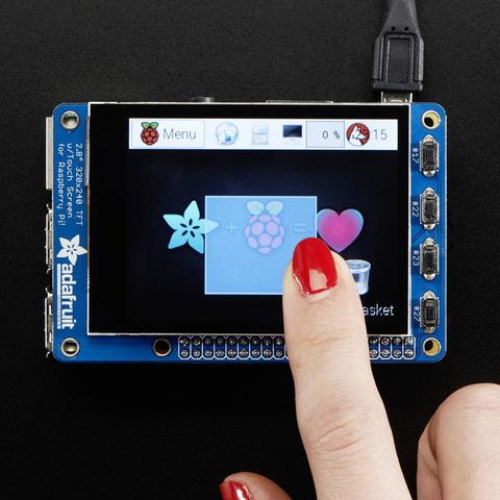
Description:Is this not the cutest little display for the Raspberry Pi? It features a 2.8″ display with 320×240 16-bit color pixels and a capacitive touch overlay. That’s right, instead of a resistive touchscreen, which requires a fingernail or stylus, you can now use a fingerpad.The screen looks much nicer, with a black bezel and glass overlay.This updated design fits perfectly onto the Pi Zero, Pi 3, Pi 2 or Model A , B ! (Any Pi with a 2×20 connector) Not for use with an old Pi 1 with 2×13 connector. This version also has all 40 pins GPIO pins brought out so you can connect a 40-pin GPIO cable underneath.The display and touchscreen uses the hardware I2C Pins (SDA & SCL), SPI pins (SCK, MOSI, MISO, CE0) as well as GPIO #25 and #24. All other GPIO are unused and you can still share the I2C pins with sensors, LED drivers, etc. Since we had a tiny bit of space, there’s 4 slim tactile switches wired to four GPIOs, that you can use if you want to make a basic user interface. For example, you can use one as a power on/off button.Use it for console access or easily pop up X11 onto the PiTFT for a mini monitor, although its rather small at 320×240. Instead, we recommend using PyGame or other SDL-drawing programs to write onto the frame buffer.Raspberry Pi computer and enclosure not included! As of July 22nd, 2015 this display comes fully assembled with tactile switches tooCheck out Adafruit’s detailed tutorial on how to play videos, display images, and otherwise customize your PiTFT.TECHNICAL DETAILSScreen Dimensions: 50mm x 69mm x 4mm / 2″ x 2.7″ x 0.16″PCB Dimensions: 56mm x 85mm x 11mm / 2.2″ x 3.3″ x 0.4″Weight: 47gDatasheets, EagleCAD PCB files, Fritzing object and more in the tutorial!
Reviews
There are no reviews yet.